ForEach Pilates › Features
Stop Sharing One Admin Login
With Every Staff Member
Invite a receptionist or instructor by email — they set their own password, and you stay in control of what they can see and change.
Ask via WhatsAppWhat Admin Sees
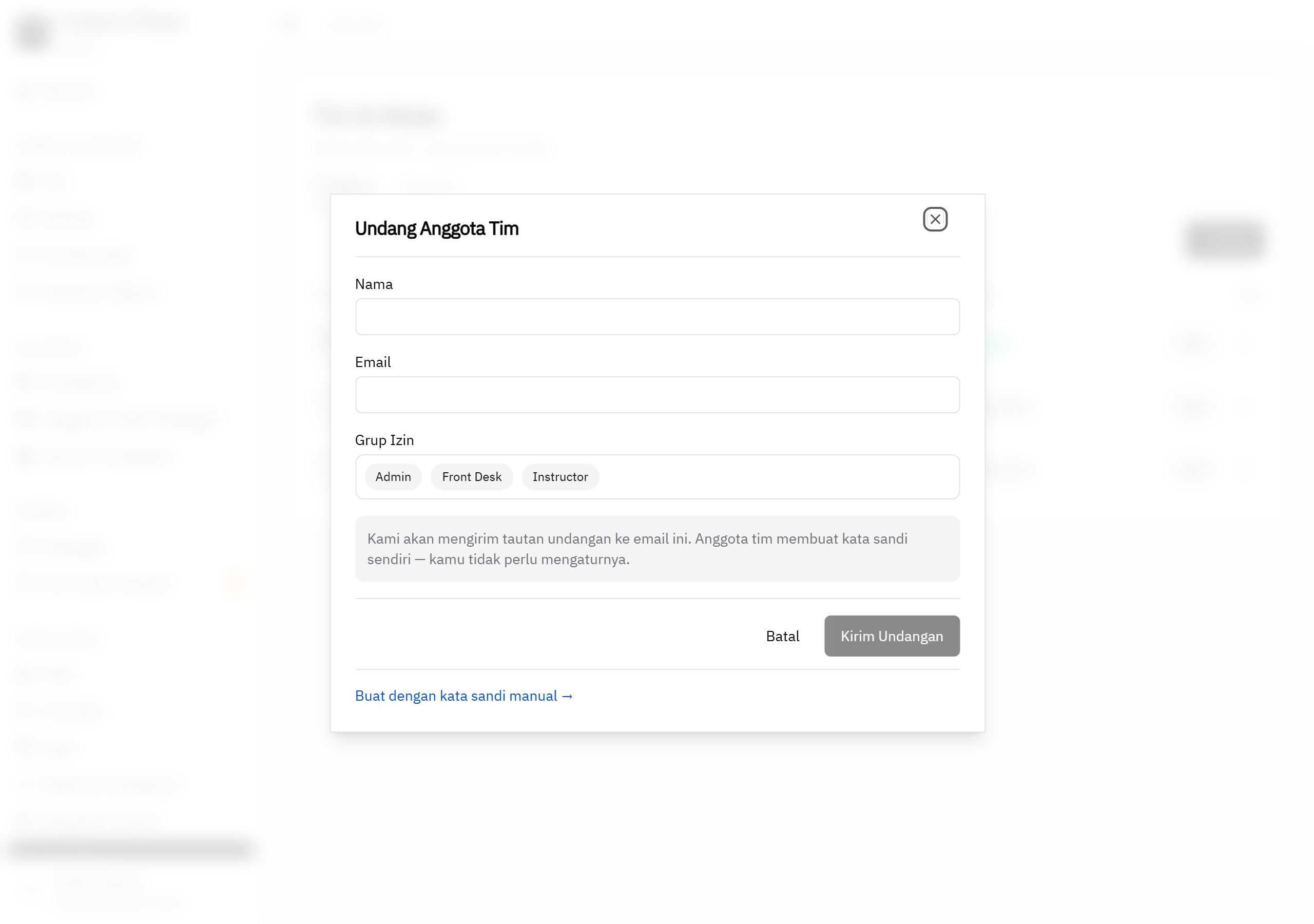
From the Team & Access page, admin invites a new team member by filling in name, email, and permission group — no need to type a password for them. The system emails an invite link to that address; whoever taps it sets their own password and is logged in right away.
Honest note: self-serve password reset ("Forgot password?") is available for staff who activated via an email invite and have a verified email. Admin can still reset a staff password or deactivate an account at any time from the Team & Access page.
Three Built-in Permission Groups
Every group's boundary is enforced server-side, not just hidden in the UI — staff genuinely cannot reach data outside their permissions, even if they try another route.
- Admin — full access: studio settings, packages, payments, reports, and team.
- Front Desk — member booking, payments, and attendance. Cannot see package settings, other staff accounts, or payment gateway credentials.
- Instructor — class schedule and attendance only, for day-to-day teaching needs.
How It Works
- Admin opens Team & Access — fill in name, email, and pick a permission group for the new team member.
- System sends the invite — an email with an invite link goes out automatically.
- Staff set their own password — tap the link, create a password, log in right away. Admin never knows or needs to set their password.
- Forgot password? Self-serve — verified staff can reset it themselves via "Forgot password?" without bothering admin.
Common Questions
How do I add a new staff member to the system?
Admin invites staff by email from the Team & Access page — fill in name, email, and pick a permission group (Admin, Front Desk, or Instructor). No need to type a password for them.
Do invited staff set their own password?
Yes. Staff receive an invite link by email, tap it, and set their own password. They're logged in right after.
What if a staff member forgets their password?
Staff who activated via an email invite can tap "Forgot password?" on the login page and reset it themselves, without needing to ask admin.
What kinds of access can I give staff?
There are three built-in permission groups: Admin (full access), Front Desk (booking, payments, and attendance — cannot see package settings, other staff accounts, or payment gateway credentials), and Instructor (schedule and attendance only). Every group's boundary is enforced server-side, not just hidden in the UI.
Can I cancel an invite or revoke a staff member's access?
Yes. Unclaimed invites can be revoked directly from the Team & Access page. Active staff accounts can also be deactivated by admin at any time.
Give Your Team Safe Access
Staff access control and multi-admin is part of ForEach Pilates — starting at Rp 200,000/month for the first 5 studios. All core features included, no limits on members or classes.
Contact via WhatsApp for a Demo← See ForEach's staff access control and multi-admin features